
The IaC dashboard and management platform for Terraform and OpenTofu
IaCConsole is an open-source IaC software platform for DevOps, DevSecOps, and FinOps teams. It combines an IaC dashboard, CMDB-backed inventory, AI and agentic automation, plan review, and an apply gate for Terraform and OpenTofu.
- IaC dashboard, app CMDB, and Internal Developer Portal — shared inventory, projects, and self-service in one place.
- Full-capability AI agents — read the CMDB (never secrets) and write ready-to-deploy Terraform and OpenTofu.
- AI plan verification and apply gate — every plan is checked; only a human can apply.
- Service Catalog and projects — approved patterns with an audit trail from proposal to apply.
- MCP server and REST API — connect Claude Code, Codex, Jenkins, Temporal, and your automation.
💡No sign-up required. The demo opens a pre-configured console with real dashboards, inventory, and agent conversations.
Credentials stay in your environment in Secure Agent Mode.
Standard HCL output with no proprietary runtime.
CHOOSE AN ACTIVE SLACK CHANNEL WORKFLOW:
ops-assistant
Your AI DevOps Team Space
Message #ops-assistant
Free and open-source IaC tools
The IaCConsole GitHub organization publishes IaC tools for the work DevOps, DevSecOps, and FinOps engineers do every day, from Linux and macOS hosts to Kubernetes clusters and CI pipelines. Clone them, run them, or read the source.
prescaler
A Kubernetes operator that pre-scales workloads from CPU usage so pods are ready before traffic arrives.
iacconsole-cli
Configuration management CLI for OpenTofu and Terraform with file-based storage, Units, and Dimensions.
go-entrypoint
A small entrypoint binary that starts your app with secrets from Vault and forwards signals correctly.
go-entrypoint-updater
Keeps go-entrypoint up to date on Kubernetes nodes so every pod uses the current entrypoint build.
An IaC dashboard, CMDB, IDP, and AI review workflow
The console at app.iacconsole.com is your IaC platform and management dashboard: it stores your configuration, gives you IaC automation and plan review before apply, exposes approved self-service patterns, and lets AI agents and external tools work from the same source of truth. There is no paid plan.
IaC dashboard and app CMDB
One IaC management dashboard and source of truth for inventory, dimensions, projects, and deployment history. Query it from the console, CLI, API, or your AI tools.
AI agents connected to the CMDB
Full-capability DevOps, DevSecOps, and FinOps assistants read your stored configuration (never secrets), write ready-to-deploy HCL, and verify plans. They never run apply.
Plan analyzer and apply gate
AI verifies OpenTofu and Terraform plans for security, reliability, cost, and blast radius. The gate blocks risky changes, critical findings, and destroys or replacements. Only a human can approve and apply.
Internal Developer Portal
Give application teams a self-service surface while platform owners keep guardrails, approvals, and visibility.
Projects
Draft changes as projects, attach plans, review diffs, and keep an audit trail from proposal to apply.
Service Catalog
Publish approved services, databases, and jobs that developers can self-serve without bypassing the workflow.
MCP server
Connect Claude Code, Codex, or any MCP-capable client to your CMDB with a Bearer token and the standard Model Context Protocol.
REST API and automation
Drive IaC automation for the same inventory and deployment flow from Jenkins, Temporal, CI pipelines, or your own internal tooling.
Powered by free tiers
The hosted app runs on the free tiers of MongoDB, Google Cloud, and Google AI Studio. That is what lets us keep the console free while the agents work from your inventory.
IaC automation and workflow with the IaCConsole platform
Start with the CLI or the hosted IaC dashboard. The same IaC automation, inventory, code, and review flow works from a laptop, a Jenkins pipeline, a Temporal workflow, or an MCP client such as Claude Code or Codex.
COMMON TASK
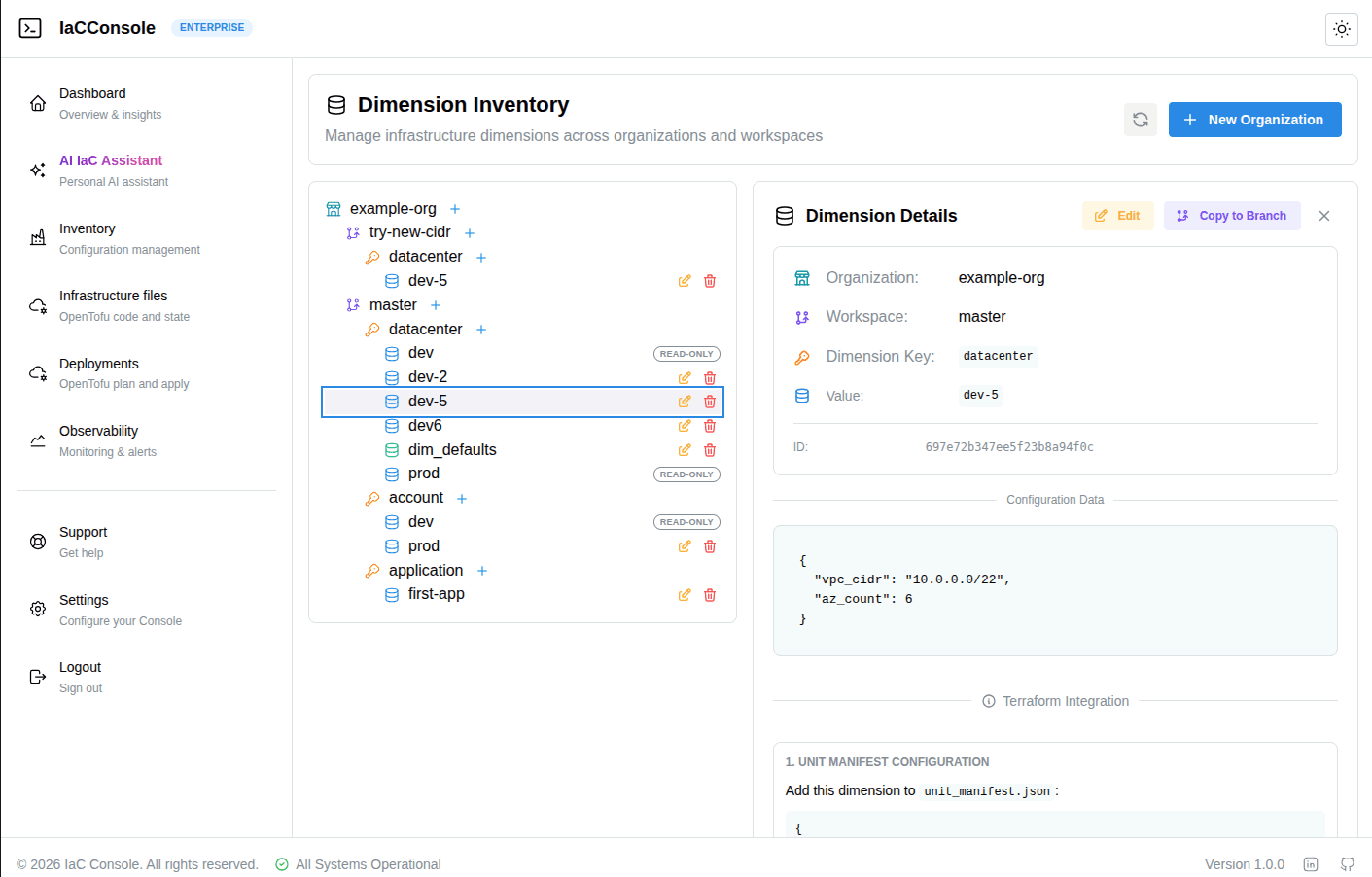
Where does the environment data live?
Keep dimensions, inventory, and project metadata in the hosted CMDB instead of scattered variable files.
The open-source CLI can also run in local mode with file-based storage when you do not want a hosted account.
COMMON TASK
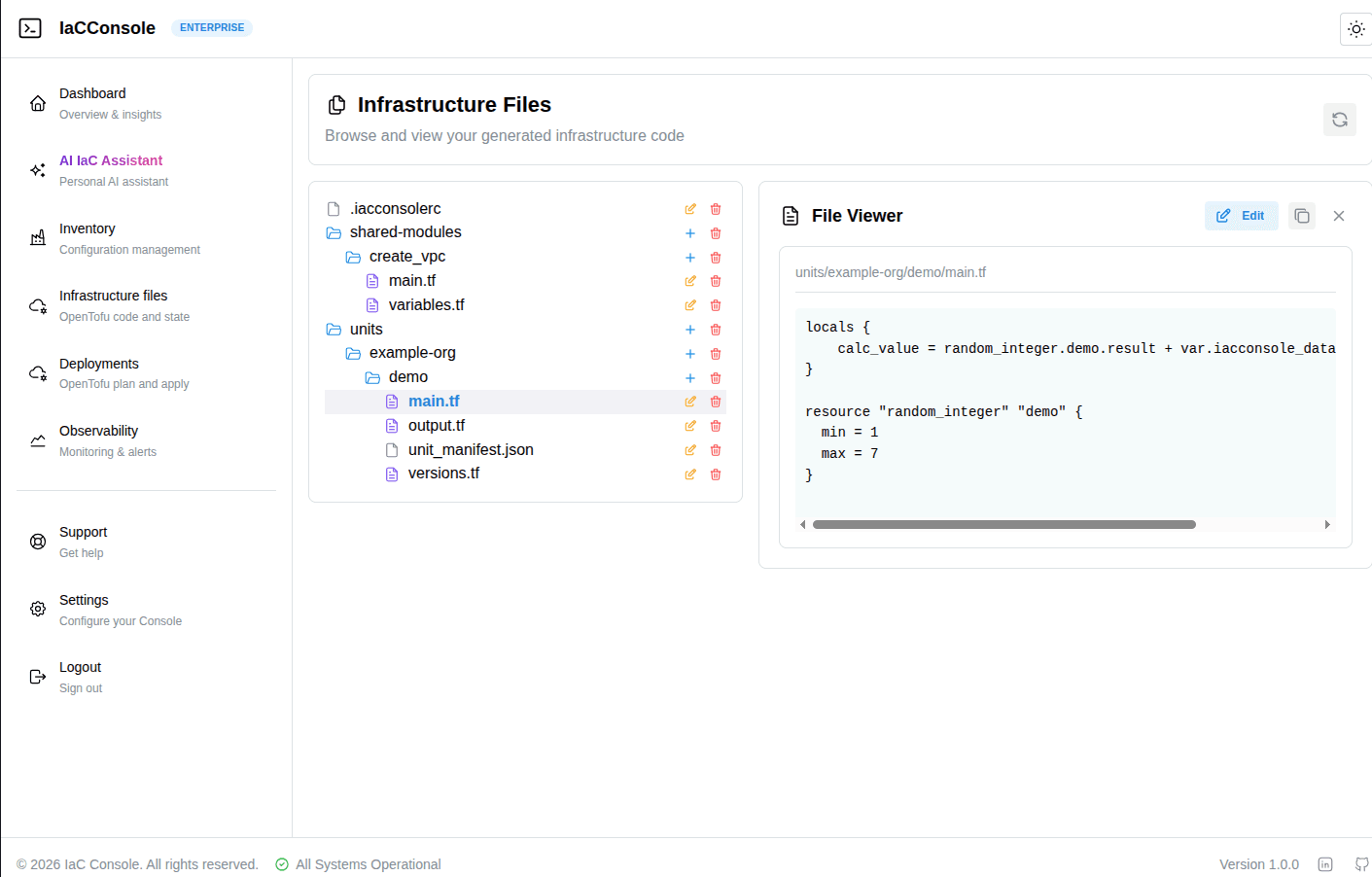
How do we stop copying modules for every environment?
Units hold reusable OpenTofu and Terraform logic. Dimensions hold the values for dev, staging, and production.
The CLI generates variables from the CMDB, so the same Unit deploys to any environment without copy-paste.
COMMON TASK
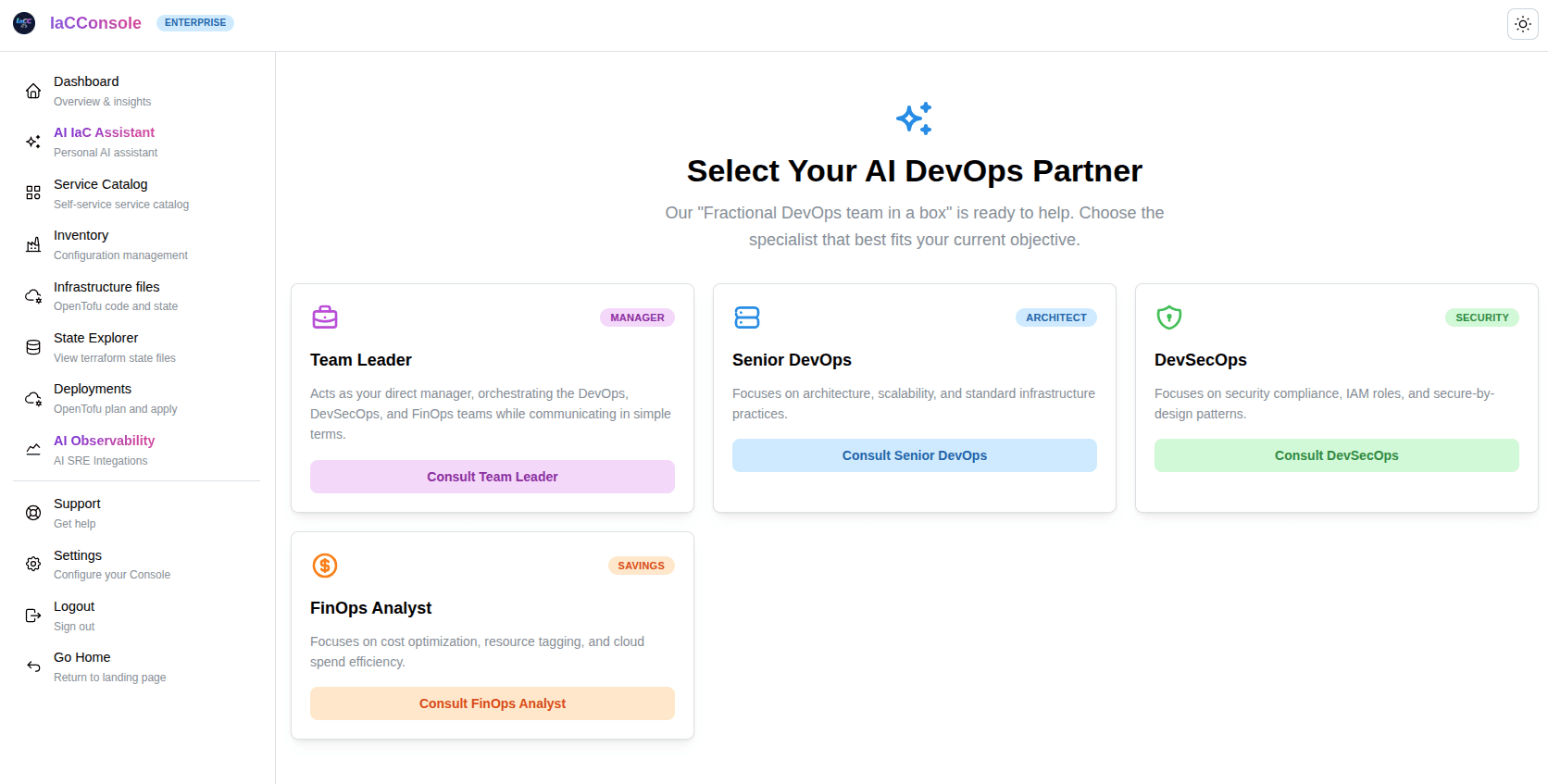
Who designs the change, and who reviews the plan?
A Team Leader coordinates Senior DevOps, DevSecOps, and FinOps agents with access to your CMDB, excluding secrets.
They design the architecture and write ready-to-deploy standard HCL from your real configuration, which you can inspect, export, and run anywhere.
COMMON TASK
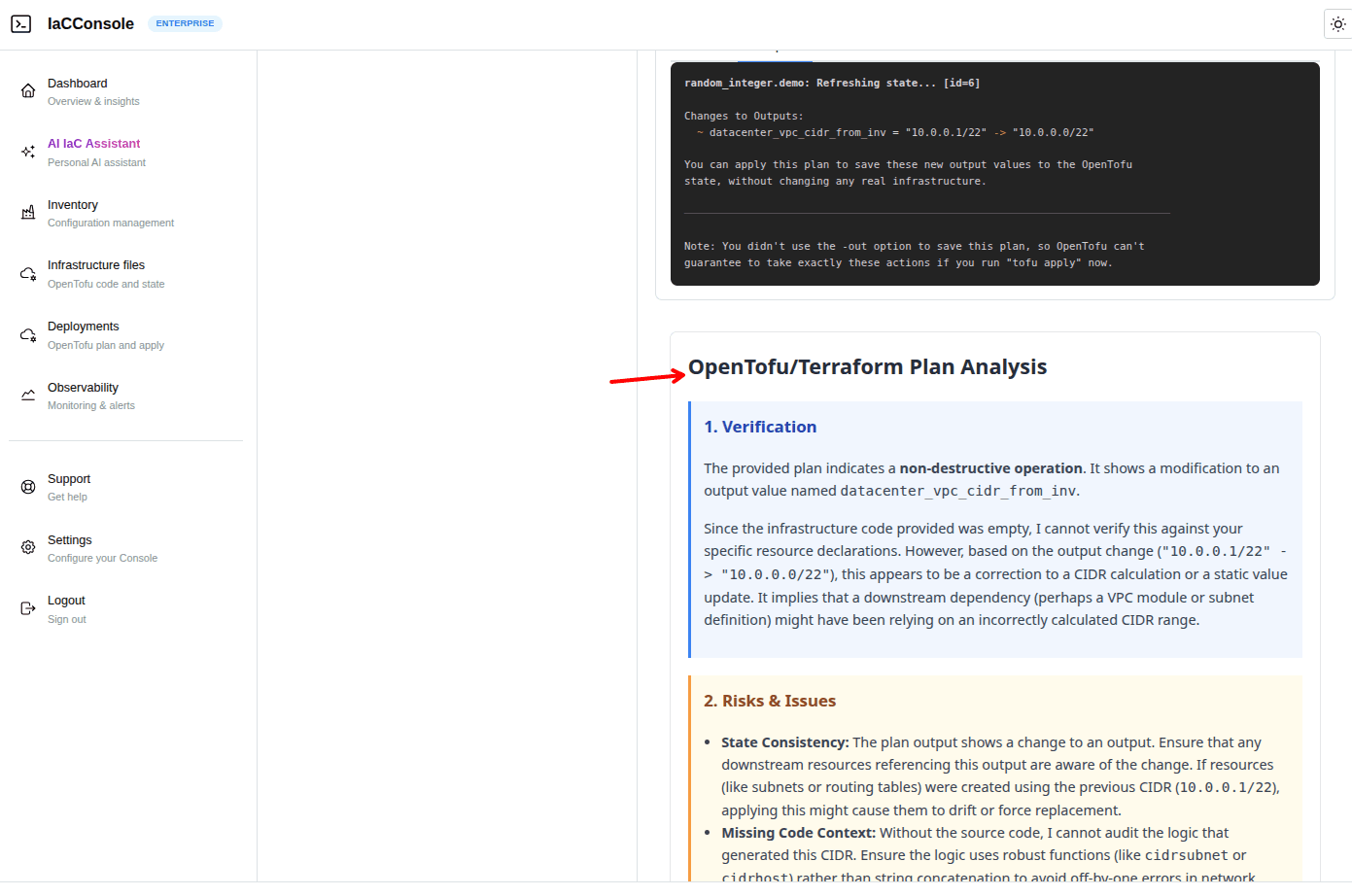
What stops a risky change from reaching production?
AI plan verification runs against the plan and the source HCL, and returns structured findings on security, reliability, cost, and blast radius.
The apply gate blocks a plan when verification is missing, the verdict is risky, a critical finding exists, or resources are destroyed or replaced. The agents never apply; a human approves and triggers the change.
COMMON TASK
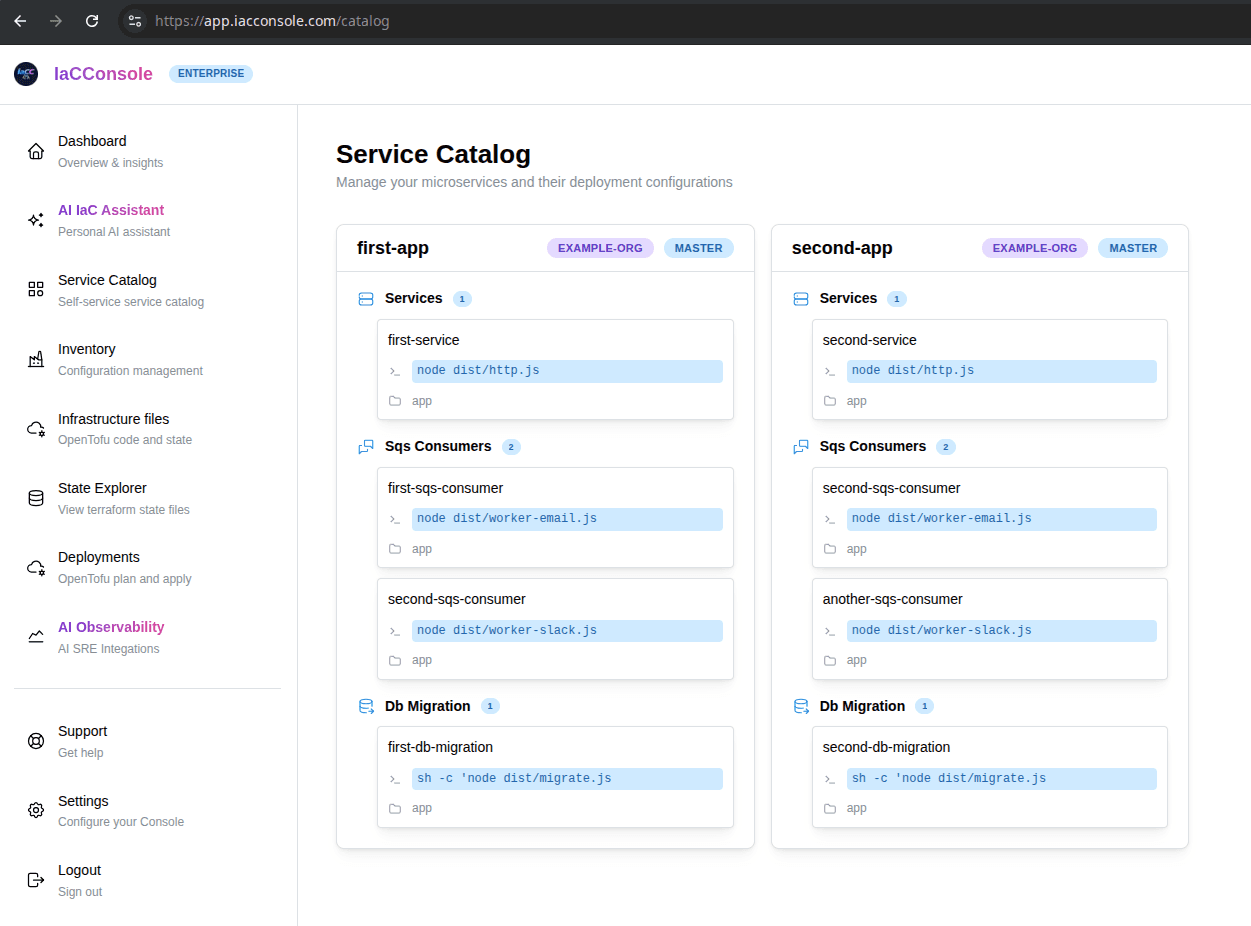
How do developers deploy without bypassing the workflow?
Publish approved services, databases, and jobs in the Service Catalog.
Application developers self-serve from the Internal Developer Portal while platform owners keep the guardrails.
COMMON TASK
Can the same workflow run outside the console?
Run the CLI on a laptop, VM, or CI runner, and trigger it from Jenkins, Temporal, or any pipeline that can call a binary or the REST API.
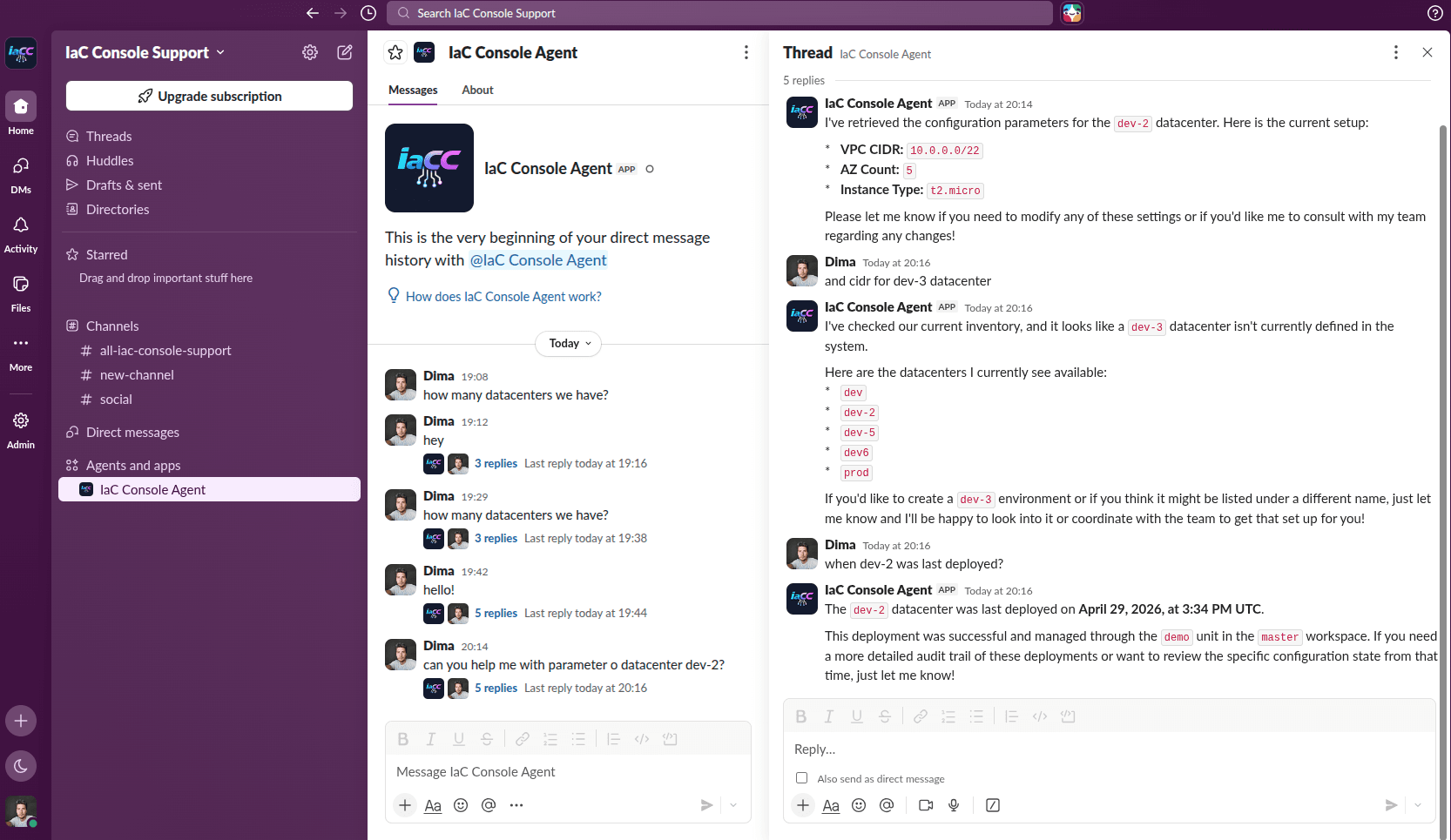
Connect Claude Code, Codex, or any MCP-capable client to query your CMDB. Slack is also available in private beta.
The web app and database can be self-hosted on request; AI calls go through your own Gemini API credentials.
Frequently asked questions
Short answers about the open-source tools, the free hosted app CMDB, AI agents, plan verification, and how execution works.
What is IaCConsole?
IaCConsole is a set of free open-source tools for DevOps, DevSecOps, and FinOps, plus a free hosted app CMDB and Internal Developer Portal. The hosted console adds full-capability AI agents connected to your CMDB, a Terraform and OpenTofu plan analyzer with an apply gate, projects, a Service Catalog, and an MCP server and REST API for external tools.
What is agentic IaC?
Agentic IaC means AI agents take part in the Infrastructure as Code workflow: they read your CMDB, design changes, write Terraform or OpenTofu HCL, and verify plans. IaCConsole agents stop before apply, so a human approves the final change.
What is AI IaC?
AI IaC is Infrastructure as Code written, reviewed, and verified with AI assistance. In IaCConsole, AI IaC means agents connected to your CMDB read the stored configuration, generate Terraform or OpenTofu HCL, and check the resulting plan, while a human keeps the final apply decision.
Is IaCConsole an IaC management platform?
Yes. IaCConsole combines an IaC dashboard, app CMDB, Internal Developer Portal, open-source CLI, AI agents, and an apply gate. You can use the free hosted platform or run the open-source CLI locally without an account.
Is IaCConsole an IaC platform for DevOps teams?
Yes. IaCConsole is an IaC platform for DevOps, DevSecOps, and FinOps teams. It combines an IaC dashboard, CMDB-backed inventory, IaC automation, plan review, and an apply gate for Terraform and OpenTofu. You can use the hosted platform or run the open-source CLI locally.
What is an IaC dashboard and what does it show?
The IaC dashboard is the console at app.iacconsole.com. It shows your inventory and dimensions, projects, deployment history, plan review findings, Service Catalog, and the status of AI agents and self-hosted agents from one place.
What is IaC automation?
IaC automation is the practice of generating, validating, and running Terraform or OpenTofu changes through a repeatable pipeline instead of manual console work. IaCConsole provides IaC automation through the CLI, REST API, Jenkins and Temporal integration, AI plan review, and an apply gate.
What is Kubernetes IaC?
Kubernetes IaC is the practice of managing Kubernetes resources and cluster add-ons as code with Terraform, OpenTofu, Helm, or a GitOps flow. IaCConsole connects Kubernetes IaC to the same CMDB and review workflow, and prescaler pre-scales Kubernetes workloads from CPU usage.
Does IaCConsole work in unattended mode?
Yes. Run iacconsole-cli agent --auto-execute when you want the local agent to execute queued jobs without prompting, or call the CLI and REST API from Jenkins, Temporal, or another CI runner. The hosted apply gate still blocks risky plans, and production apply can remain a human approval step.
How does IaCConsole work with Kubernetes and Jenkins?
prescaler is a Kubernetes operator that pre-scales workloads from CPU usage, while the CLI can run in Jenkins or any CI runner to execute Terraform and OpenTofu. The CMDB and IaC dashboard stay the shared source of truth for both.
Is IaCConsole free?
Yes. The four repositories in the IaCConsole GitHub organization are free to use, and app.iacconsole.com is free to use as a CMDB and Internal Developer Portal. There is no paid plan. You still pay your own cloud provider for the infrastructure you create.
Which repositories are open source?
There are four: prescaler, a Kubernetes operator that pre-scales workloads from CPU usage; iacconsole-cli, a configuration management CLI for OpenTofu and Terraform; go-entrypoint, which starts an app with secrets from Vault and forwards signals; and go-entrypoint-updater, which keeps go-entrypoint current on Kubernetes nodes.
Do I need the hosted app to use the open-source tools?
No. The CLI runs in local mode with file-based storage, and the Kubernetes tools run in your own cluster. The hosted console is there when you want a shared CMDB, a self-service catalog, AI agents, and a review workflow in one place.
Can IaCConsole run self-hosted IaC agents?
Yes. The CLI can run as a self-hosted IaC agent on a laptop, VM, or CI runner. It connects outbound to the console, executes Terraform and OpenTofu in your environment, and keeps cloud credentials local. Teams also use it as an IaC accelerator because it handles variable injection and state backends for them.
How do the AI agents work?
A Team Leader coordinates full-capability Senior DevOps, DevSecOps, and FinOps agents. They are connected to your CMDB, excluding secrets, so they read your stored configuration, design the change, and write ready-to-deploy OpenTofu or Terraform HCL. They verify plans for security, reliability, and cost, but they never execute apply. A human approves the AI-verified plan and triggers the change.
What does the plan analyzer and apply gate do?
AI plan verification runs against the plan and the source HCL and returns structured findings on security, reliability, cost, and blast radius. The apply gate blocks a plan when verification is missing, the verdict is risky, a critical finding exists, or resources are destroyed or replaced. Only a human can approve and apply.
Can I use IaCConsole from Claude Code, Codex, or CI/CD?
Yes. The MCP server lets Claude Code, Codex, and any other MCP-capable client query your inventory with a Bearer token. The REST API and CLI cover Jenkins, Temporal, CI pipelines, and custom automation, so the same CMDB and review flow works outside the console.
Is it safe? Do you store my AWS or GCP credentials?
In Secure Agent Mode, Terraform and OpenTofu run in your environment and your cloud credentials do not need to leave it. The AI agents can read the CMDB but do not receive stored secrets. The web console relays instructions to the local agent over an outbound connection.
Can I use IaCConsole from Slack?
Yes, but Slack is in private beta. You can try the demo in our community Slack, and we enable access for your own workspace on a short call. Once connected, you can message the bot directly, mention it in a channel, or use a slash command.
Does IaCConsole replace Terraform or OpenTofu?
No. It generates standard HCL and runs the same Terraform or OpenTofu binaries you already use. You can export the code and run it anywhere, so there is no proprietary runtime or lock-in.