
Infrastructure tools for DevOps, DevSecOps, and FinOps
Run the open-source CLI and Kubernetes tools in your own environment. The free hosted console adds:
- App CMDB and Internal Developer Portal — shared inventory, projects, and self-service in one place.
- Full-capability AI agents — read the CMDB (never secrets) and write ready-to-deploy Terraform and OpenTofu.
- AI plan verification and apply gate — every plan is checked; only a human can apply.
- Service Catalog and projects — approved patterns with an audit trail from proposal to apply.
- MCP server and REST API — connect Claude Code, Codex, Jenkins, Temporal, and your automation.
💡No sign-up required. The demo opens a pre-configured console with real dashboards, inventory, and agent conversations.
Credentials stay in your environment in Secure Agent Mode.
Standard HCL output with no proprietary runtime.
CHOOSE AN ACTIVE SLACK CHANNEL WORKFLOW:
ops-assistant
Your AI DevOps Team Space
Message #ops-assistant
Free and open-source tools
The IaCConsole GitHub organization publishes tools for the work DevOps, DevSecOps, and FinOps engineers do every day. Clone them, run them, or read the source.
prescaler
A Kubernetes operator that pre-scales workloads from CPU usage so pods are ready before traffic arrives.
iacconsole-cli
Configuration management CLI for OpenTofu and Terraform with file-based storage, Units, and Dimensions.
go-entrypoint
A small entrypoint binary that starts your app with secrets from Vault and forwards signals correctly.
go-entrypoint-updater
Keeps go-entrypoint up to date on Kubernetes nodes so every pod uses the current entrypoint build.
An app CMDB, IDP, and AI review workflow
The console at app.iacconsole.com stores your configuration, exposes approved self-service patterns, verifies plans before apply, and lets AI agents and external tools work from the same source of truth. There is no paid plan.
App CMDB
One source of truth for inventory, dimensions, projects, and deployment history. Query it from the console, CLI, API, or your AI tools.
AI agents connected to the CMDB
Full-capability DevOps, DevSecOps, and FinOps assistants read your stored configuration (never secrets), write ready-to-deploy HCL, and verify plans. They never run apply.
Plan analyzer and apply gate
AI verifies OpenTofu and Terraform plans for security, reliability, cost, and blast radius. The gate blocks risky changes, critical findings, and destroys or replacements. Only a human can approve and apply.
Internal Developer Portal
Give application teams a self-service surface while platform owners keep guardrails, approvals, and visibility.
Projects
Draft changes as projects, attach plans, review diffs, and keep an audit trail from proposal to apply.
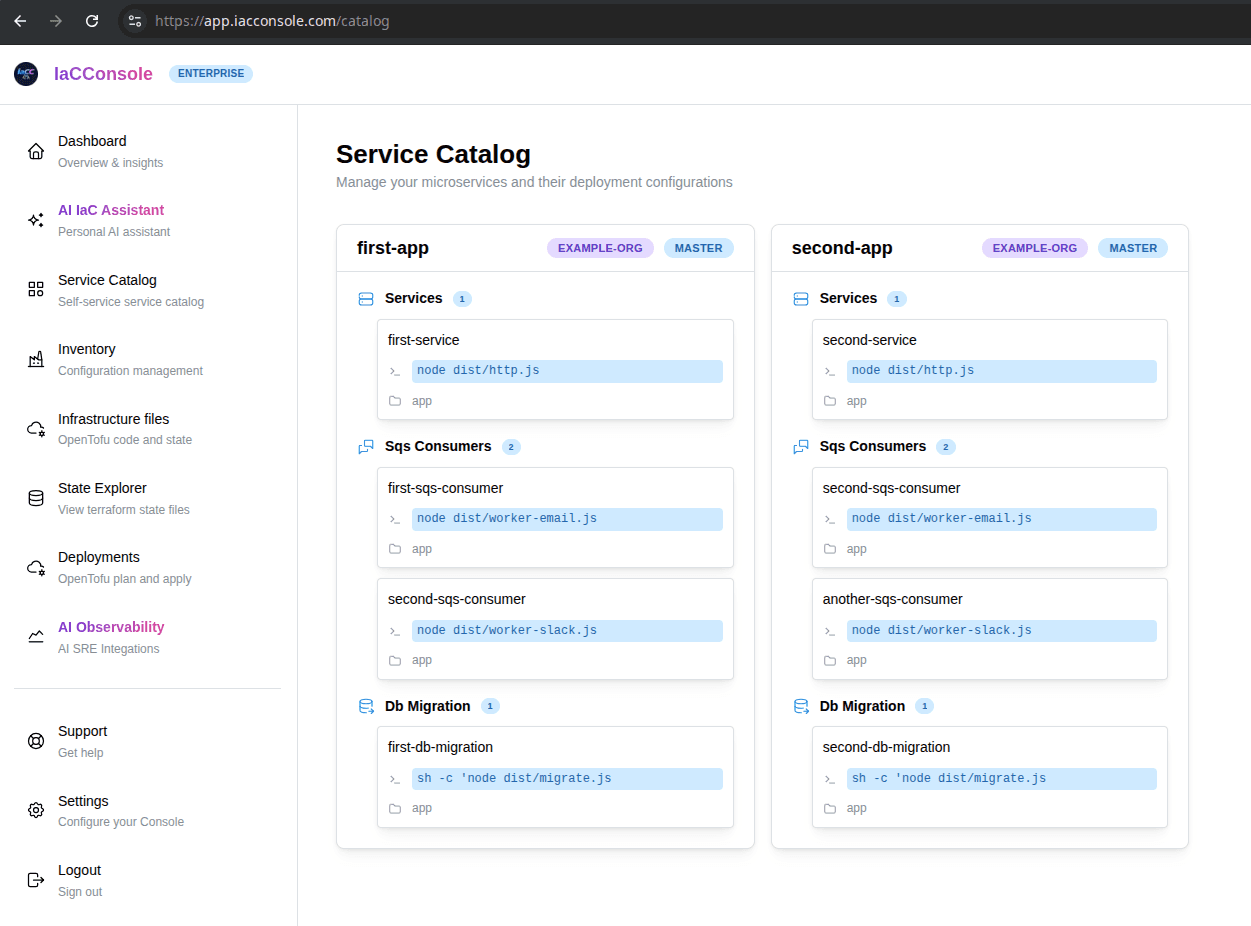
Service Catalog
Publish approved services, databases, and jobs that developers can self-serve without bypassing the workflow.
MCP server
Connect Claude Code, Codex, or any MCP-capable client to your CMDB with a Bearer token and the standard Model Context Protocol.
REST API and automation
Drive the same inventory and deployment flow from Jenkins, Temporal, CI pipelines, or your own internal tooling.
Powered by free tiers
The hosted app runs on the free tiers of MongoDB, Google Cloud, and Google AI Studio. That is what lets us keep the console free while the agents work from your inventory.
How the IaC Console fits your workflow
Start with the CLI or the hosted app. The same inventory, code, and review flow works from a laptop, a Jenkins pipeline, a Temporal workflow, or an MCP client such as Claude Code or Codex.
COMMON TASK
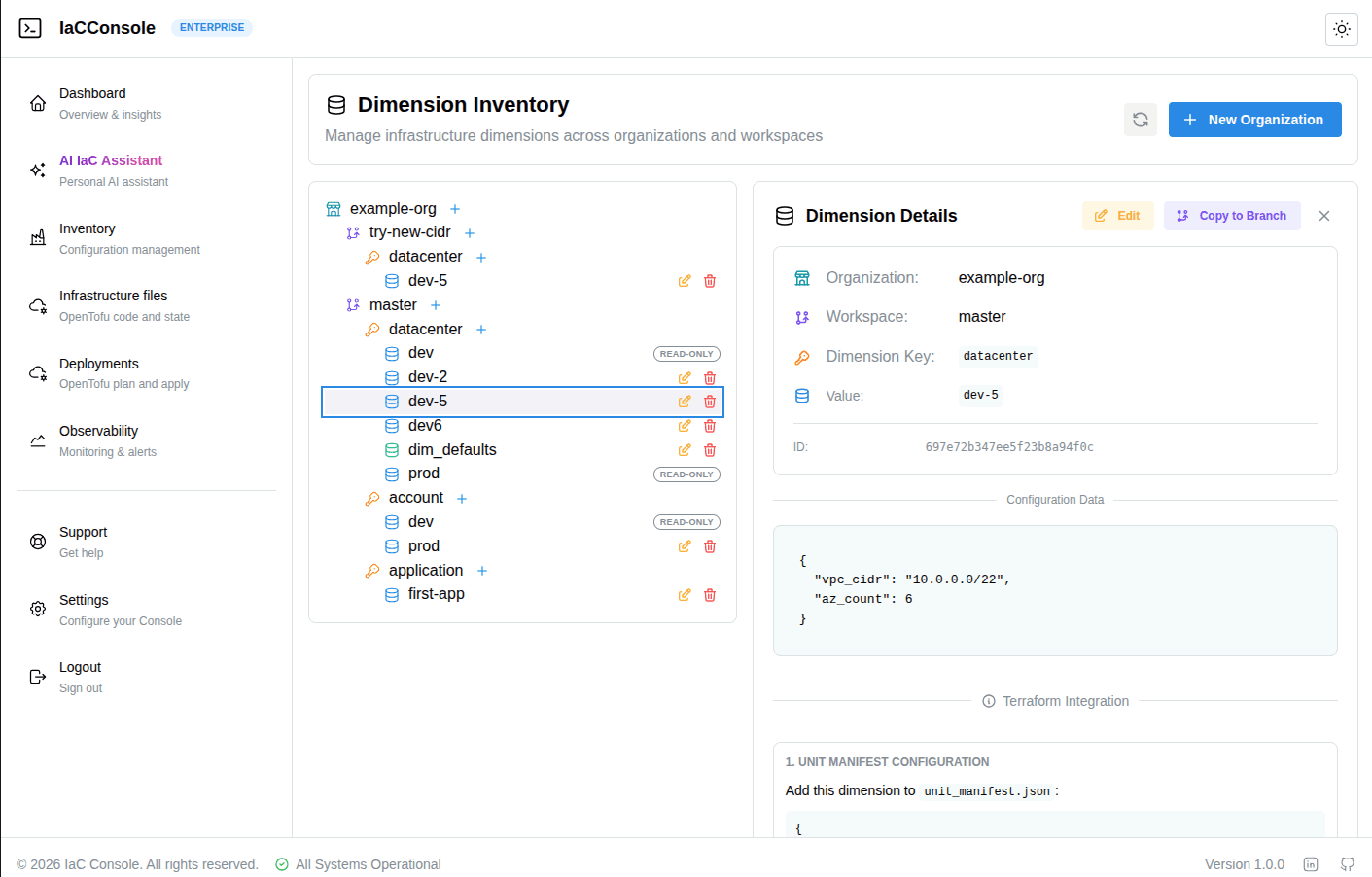
Where does the environment data live?
Keep dimensions, inventory, and project metadata in the hosted CMDB instead of scattered variable files.
The open-source CLI can also run in local mode with file-based storage when you do not want a hosted account.
COMMON TASK
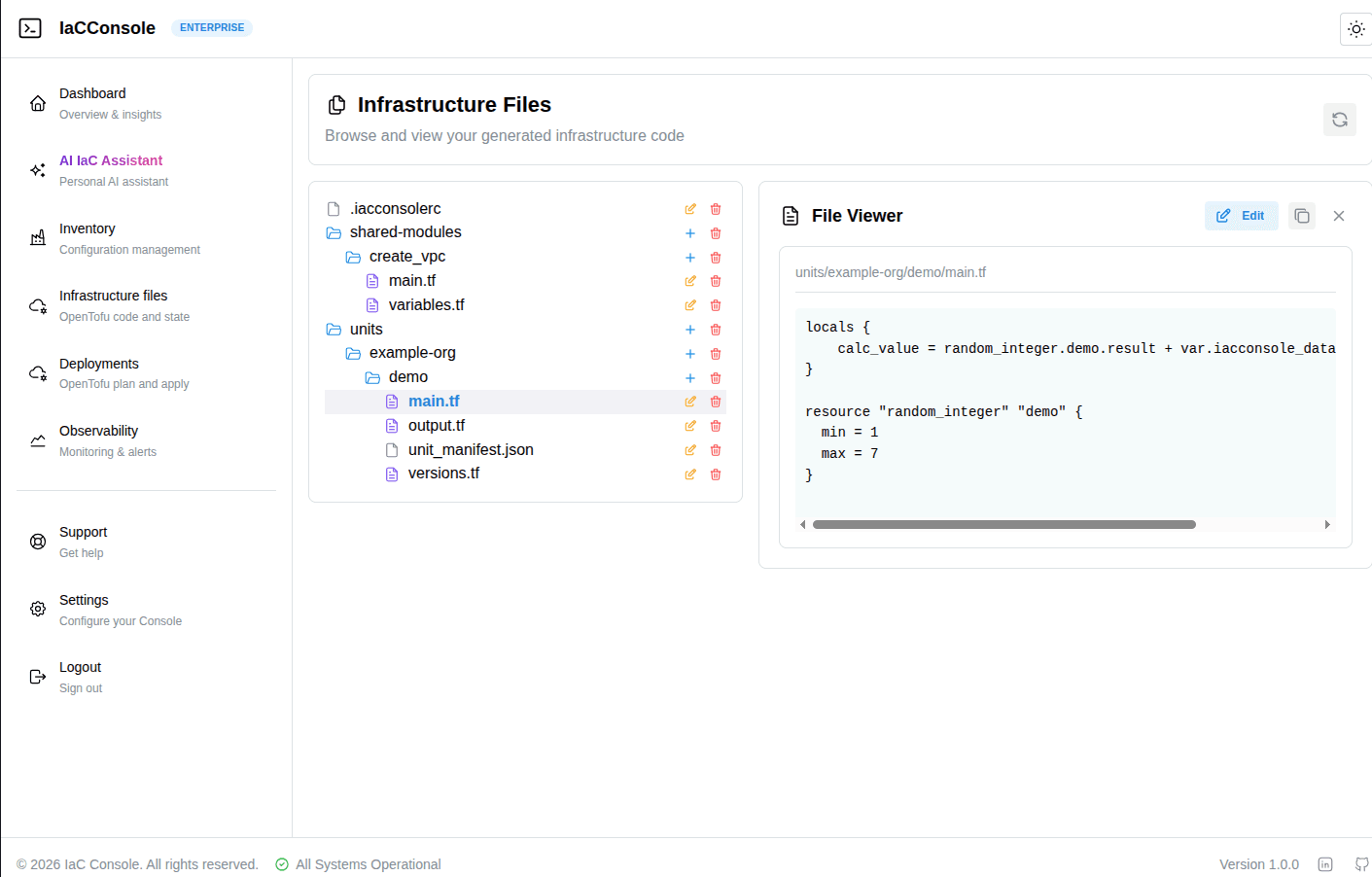
How do we stop copying modules for every environment?
Units hold reusable OpenTofu and Terraform logic. Dimensions hold the values for dev, staging, and production.
The CLI generates variables from the CMDB, so the same Unit deploys to any environment without copy-paste.
COMMON TASK
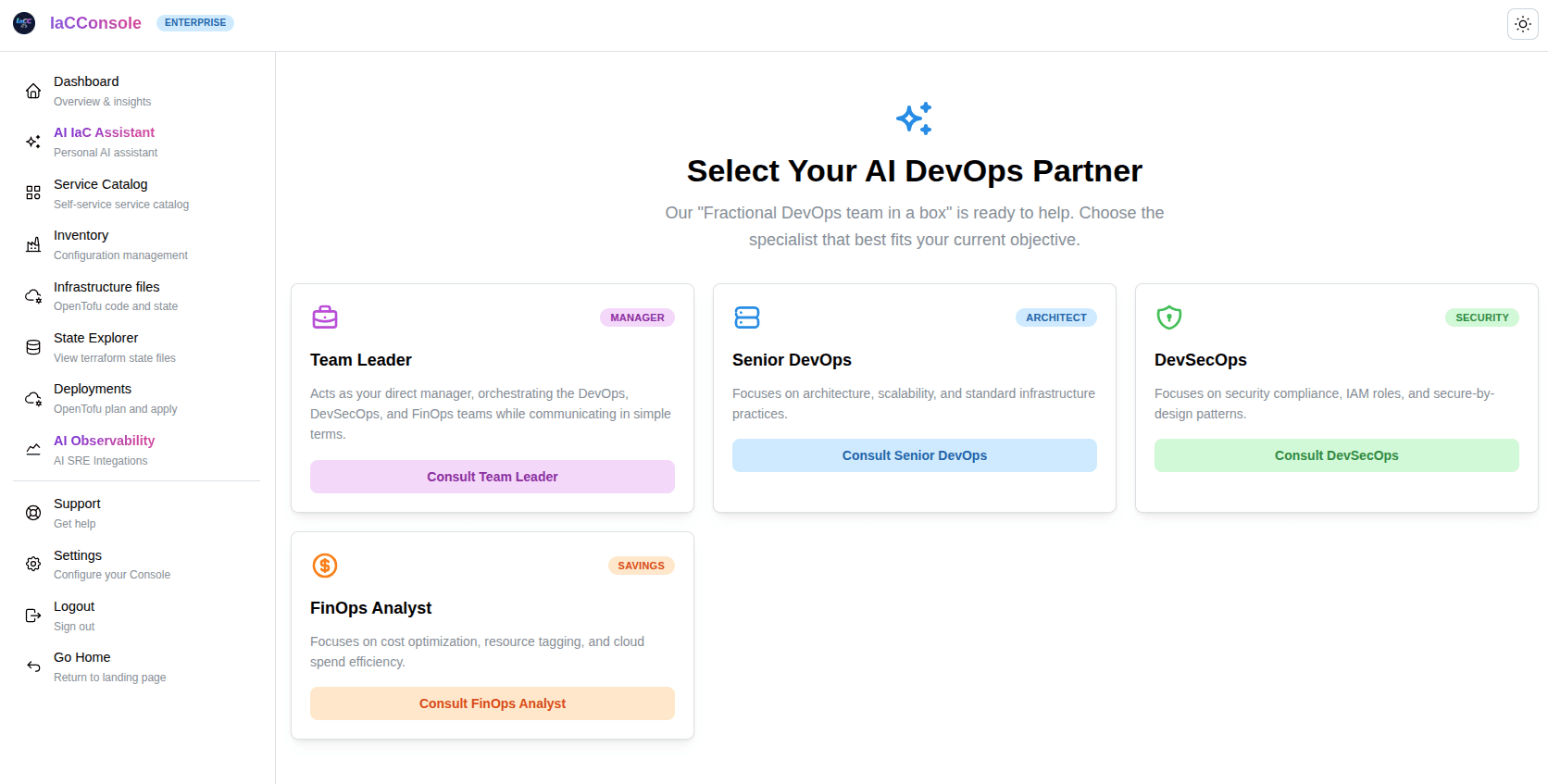
Who designs the change, and who reviews the plan?
A Team Leader coordinates Senior DevOps, DevSecOps, and FinOps agents with access to your CMDB, excluding secrets.
They design the architecture and write ready-to-deploy standard HCL from your real configuration, which you can inspect, export, and run anywhere.
COMMON TASK
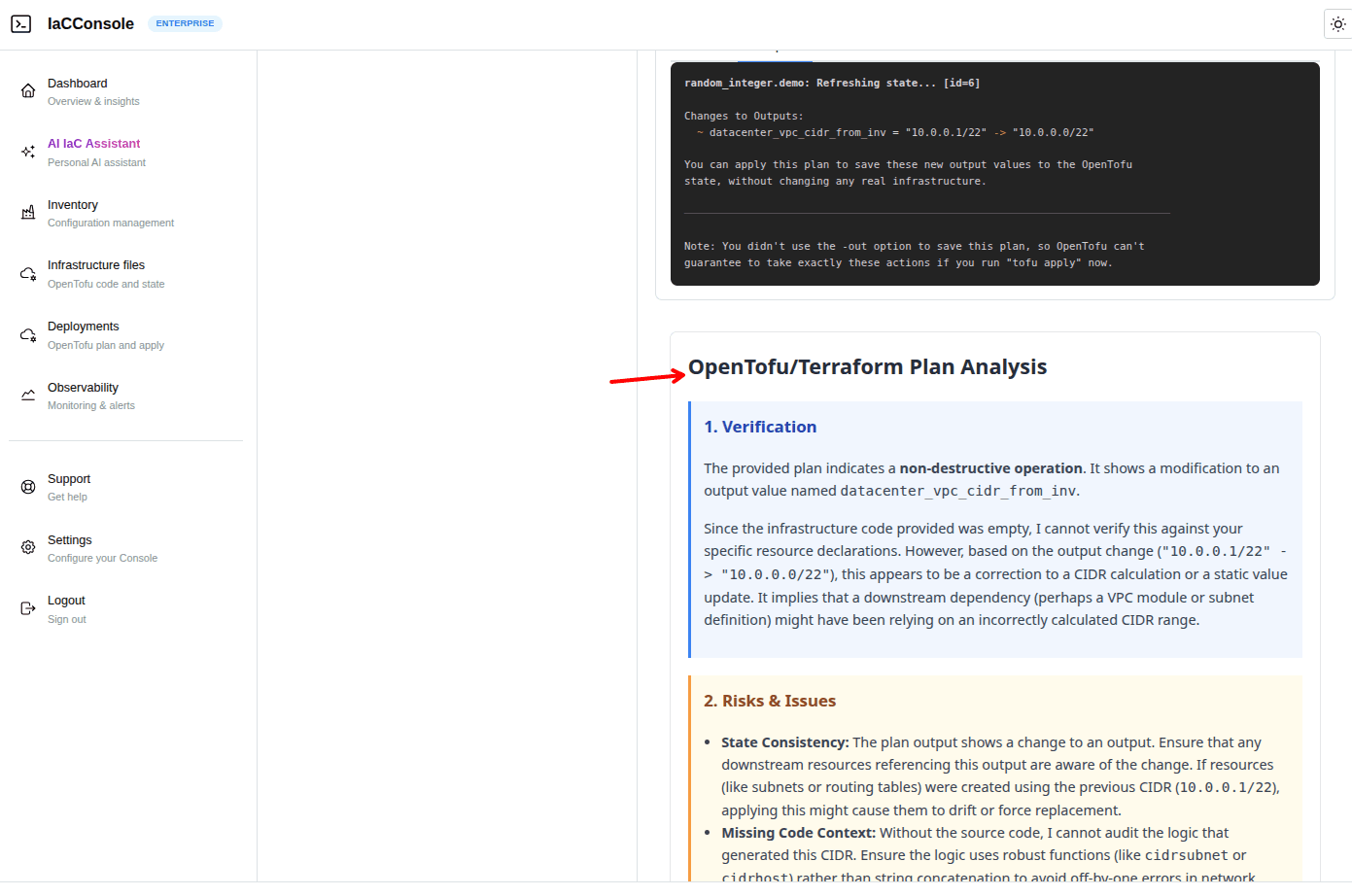
What stops a risky change from reaching production?
AI plan verification runs against the plan and the source HCL, and returns structured findings on security, reliability, cost, and blast radius.
The apply gate blocks a plan when verification is missing, the verdict is risky, a critical finding exists, or resources are destroyed or replaced. The agents never apply; a human approves and triggers the change.
COMMON TASK
How do developers deploy without bypassing the workflow?
Publish approved services, databases, and jobs in the Service Catalog.
Application developers self-serve from the Internal Developer Portal while platform owners keep the guardrails.
COMMON TASK
Can the same workflow run outside the console?
Run the CLI on a laptop, VM, or CI runner, and trigger it from Jenkins, Temporal, or any pipeline that can call a binary or the REST API.
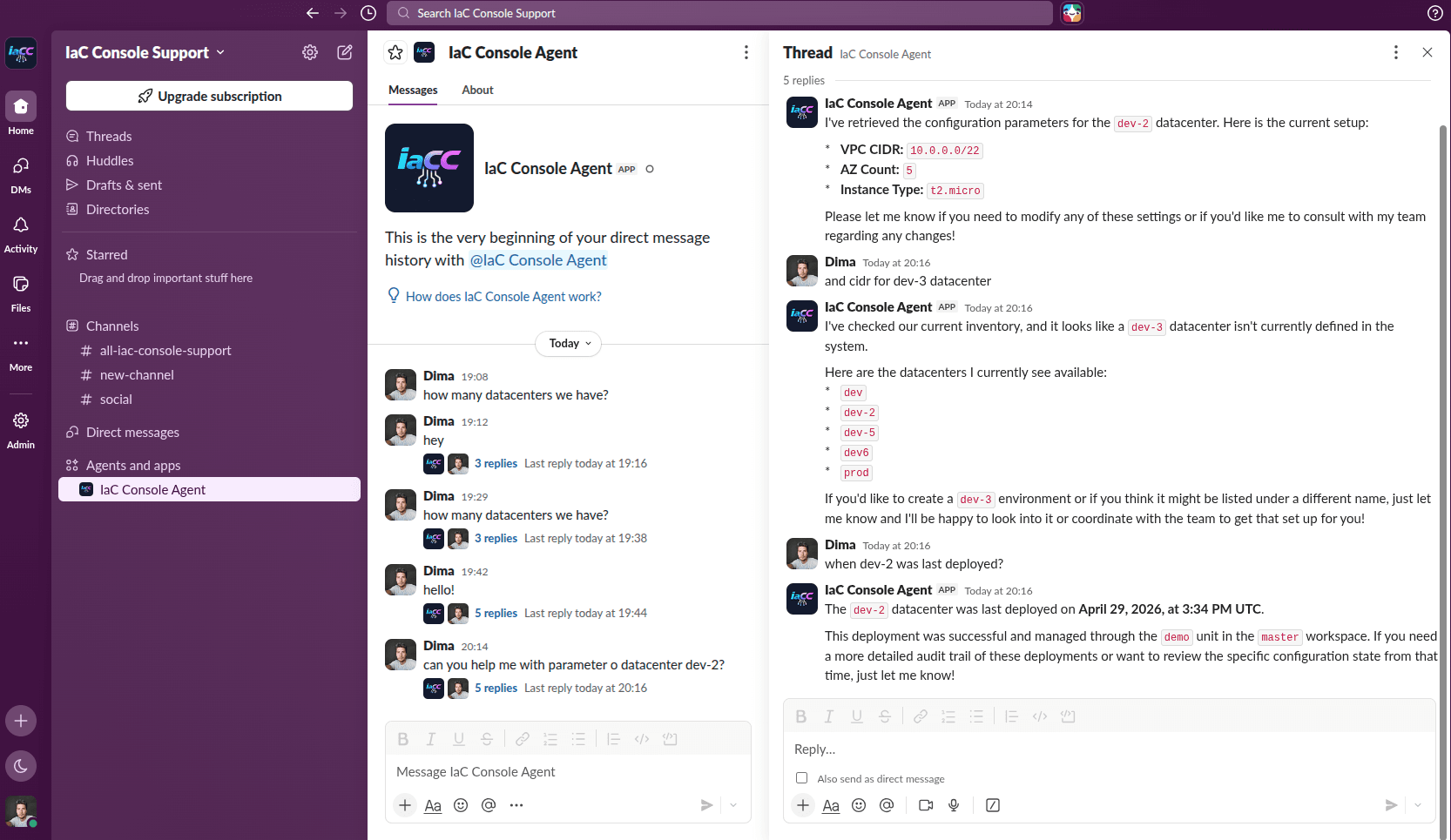
Connect Claude Code, Codex, or any MCP-capable client to query your CMDB. Slack is also available in private beta.
The web app and database can be self-hosted on request; AI calls go through your own Gemini API credentials.
Frequently asked questions
Short answers about the open-source tools, the free hosted app CMDB, AI agents, plan verification, and how execution works.
What is IaCConsole?
IaCConsole is a set of free open-source tools for DevOps, DevSecOps, and FinOps, plus a free hosted app CMDB and Internal Developer Portal. The hosted console adds full-capability AI agents connected to your CMDB, a Terraform and OpenTofu plan analyzer with an apply gate, projects, a Service Catalog, and an MCP server and REST API for external tools.
Is IaCConsole free?
Yes. The four repositories in the IaCConsole GitHub organization are free to use, and app.iacconsole.com is free to use as a CMDB and Internal Developer Portal. There is no paid plan. You still pay your own cloud provider for the infrastructure you create.
Which repositories are open source?
There are four: prescaler, a Kubernetes operator that pre-scales workloads from CPU usage; iacconsole-cli, a configuration management CLI for OpenTofu and Terraform; go-entrypoint, which starts an app with secrets from Vault and forwards signals; and go-entrypoint-updater, which keeps go-entrypoint current on Kubernetes nodes.
Do I need the hosted app to use the open-source tools?
No. The CLI runs in local mode with file-based storage, and the Kubernetes tools run in your own cluster. The hosted console is there when you want a shared CMDB, a self-service catalog, AI agents, and a review workflow in one place.
How do the AI agents work?
A Team Leader coordinates full-capability Senior DevOps, DevSecOps, and FinOps agents. They are connected to your CMDB, excluding secrets, so they read your stored configuration, design the change, and write ready-to-deploy OpenTofu or Terraform HCL. They verify plans for security, reliability, and cost, but they never execute apply. A human approves the AI-verified plan and triggers the change.
What does the plan analyzer and apply gate do?
AI plan verification runs against the plan and the source HCL and returns structured findings on security, reliability, cost, and blast radius. The apply gate blocks a plan when verification is missing, the verdict is risky, a critical finding exists, or resources are destroyed or replaced. Only a human can approve and apply.
Can I use IaCConsole from Claude Code, Codex, or CI/CD?
Yes. The MCP server lets Claude Code, Codex, and any other MCP-capable client query your inventory with a Bearer token. The REST API and CLI cover Jenkins, Temporal, CI pipelines, and custom automation, so the same CMDB and review flow works outside the console.
Is it safe? Do you store my AWS or GCP credentials?
In Secure Agent Mode, Terraform and OpenTofu run in your environment and your cloud credentials do not need to leave it. The AI agents can read the CMDB but do not receive stored secrets. The web console relays instructions to the local agent over an outbound connection.
Can I use IaCConsole from Slack?
Yes, but Slack is in private beta. You can try the demo in our community Slack, and we enable access for your own workspace on a short call. Once connected, you can message the bot directly, mention it in a channel, or use a slash command.
Does IaCConsole replace Terraform or OpenTofu?
No. It generates standard HCL and runs the same Terraform or OpenTofu binaries you already use. You can export the code and run it anywhere, so there is no proprietary runtime or lock-in.